It was never my intention to buy this game, I always thought and still do think that the whole thing is a bit of a gimmick. But I wanted a balance board for a couple of other games and to be honest, it really wouldn't do me any harm to lose some weight. So if it did work then that would be a bonus.
Initial set up was nice and easy and the end result was unsurprising. It lists me as being just inside the obese category which I already knew, just confirming (as if it needed) that I have to lose weight.
I took part in a few of the activities and while they didn't seem too taxing at the time, I now realise that it actually has given me a bit of a workout. I can feel my muscles ache slightly, not in a "I can't move" way, but in an "enough to know I've done something active" way.
I'm still not sold on the game being able to help me lose weight in any meaningful way, but I'll give it a chance and see if it makes a difference. It seems most of the activities revolve around you having to keep balance, which isn't surprising as you're using a balance board, but I don't see how maintaining your centre of gravity gets rid of fat!
I'm also not sure what the point of setting targets is, I thought it would create a workout programme for me to help meet my goals. But I just seem to be left to do whatever I feel like, so I have no idea how much I should be aiming to do each day. The "personal trainer" is a waste of time too, apart from demonstrating each exercise they do nothing apart from spout really annoying and unhelpful comments.
Still, let's give it a chance I'll try and play it every day for a fortnight and see if there's any improvement. Watch this space!
Sunday, 30 August 2009


Tuesday, 25 August 2009
Great hosting for Wordpress - WPWebHost
This is my first real post in quite a while, I seem to have been concentrating on my twitter account. I didn't think I'd get it at first, but I really enjoy this micro-blogging format. It's quick and easy and I don't have to think about it!
Anyway, this post is a bit of a plug for a company I've been using for a few months to host my website. I can honestly say I've never used a hosting company as good as these guys!
I can't remember how I actually found them now but I'm so glad I did. When I decided to switch my site to Wordpress from Drupal I was using a standard web hosting company. I had a problem with my Wordpress installation and they just said it's my problem to deal with, nothing wrong with their servers! After a bit of digging on the net I found that it was their service that was the problem, but there was nothing they would do to fix it. I could either put up with it or go elsewhere. That's when I hit on the WPWebHost guys!
I must admit when I signed up I had no idea what I was letting myself in for, I'd not researched them or anything. It was most unlike me to act like that, I'm normally very thorough when it comes to this sort of thing. However, my site was starting to get more visitors and I needed to switch my provider quickly! As they were fairly cheap and gave a 100 day money back guarantee I figured there was nothing to lose, it couldn't get any worse.

Once I'd signed up, their tech support simply couldn't have been any better. They offered to move my site for me from my current host to their service for free. After sending them my account details it was all done and ready to go within a couple of hours. All I had to do was update my domain registration to point to the sites new location. Super easy, amazingly efficient and a real breath of fresh air.
What makes WPWebHost so great is that they have configured and tailored their servers for Wordpress hosting. It means that things just work on their packages and the benefits of that can't be under estimated!
As always I have a had a few problems with my site, normally as a result of me doing something stupid. In every case whenever I've emailed their support, no matter what time of day I've got a response usually within an hour with the problem either fixed for me, or a solution.
The thing that's worth noting here is that it doesn't matter what the issue is. They are happy to provide technical support for Wordpress itself, I've even had them troubleshooting a plug-in I was using.
If you use Wordpress or you have a blog and you're thinking about taking it to the next level, or just considering using it for a project, I cannot recommend WPWebHost highly enough. Take a look at their Wordpress hosting packages and give it a try, if you don't like it you can always get your money back. I'm convinced that won't happen though, you can find a link to them at the top of this article!
Anyway, this post is a bit of a plug for a company I've been using for a few months to host my website. I can honestly say I've never used a hosting company as good as these guys!
I can't remember how I actually found them now but I'm so glad I did. When I decided to switch my site to Wordpress from Drupal I was using a standard web hosting company. I had a problem with my Wordpress installation and they just said it's my problem to deal with, nothing wrong with their servers! After a bit of digging on the net I found that it was their service that was the problem, but there was nothing they would do to fix it. I could either put up with it or go elsewhere. That's when I hit on the WPWebHost guys!
I must admit when I signed up I had no idea what I was letting myself in for, I'd not researched them or anything. It was most unlike me to act like that, I'm normally very thorough when it comes to this sort of thing. However, my site was starting to get more visitors and I needed to switch my provider quickly! As they were fairly cheap and gave a 100 day money back guarantee I figured there was nothing to lose, it couldn't get any worse.
Once I'd signed up, their tech support simply couldn't have been any better. They offered to move my site for me from my current host to their service for free. After sending them my account details it was all done and ready to go within a couple of hours. All I had to do was update my domain registration to point to the sites new location. Super easy, amazingly efficient and a real breath of fresh air.
What makes WPWebHost so great is that they have configured and tailored their servers for Wordpress hosting. It means that things just work on their packages and the benefits of that can't be under estimated!
As always I have a had a few problems with my site, normally as a result of me doing something stupid. In every case whenever I've emailed their support, no matter what time of day I've got a response usually within an hour with the problem either fixed for me, or a solution.
The thing that's worth noting here is that it doesn't matter what the issue is. They are happy to provide technical support for Wordpress itself, I've even had them troubleshooting a plug-in I was using.
If you use Wordpress or you have a blog and you're thinking about taking it to the next level, or just considering using it for a project, I cannot recommend WPWebHost highly enough. Take a look at their Wordpress hosting packages and give it a try, if you don't like it you can always get your money back. I'm convinced that won't happen though, you can find a link to them at the top of this article!
Saturday, 25 July 2009
What’s on your iPhone?
A friend made a blog post with all the apps he has got installed on his iPhone which you can read here:
What's in your iPhone
So in reply to that blog, here is my response. This is what's on my iPhone:
Page 1
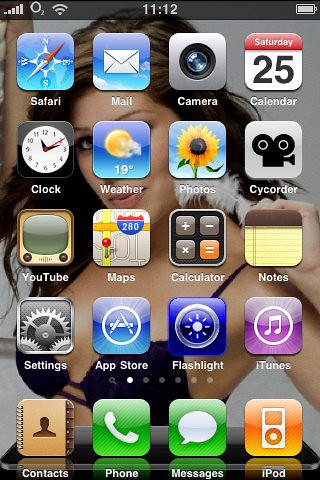
The first thing to notice is that my iPhone is jailbroken which means I can customise quite a bit on the phone. The most obvious thing is the wallpaper, having a custom wallpaper is normally only possible on the lock screen. Now whenever I see an iPhone with a black background I can't help but feel it looks boring.
Another thing you may have noticed is the reflective dock and the different image for the dock. Also the carrier logo (02) in the status bar at the top is the actual O2 logo rather than the dull O2-UK you would normally see.
Two of my app icons are also different if you look closely. The Clock app is actually showing the correct time and the Weather app has the current weather for my location displayed.
I think the only other thing worth mentioning here is the Cycorder app, this gives the iPhone 3G video capability. No need to upgrade to an iPhone 3GS for that!
Page 2
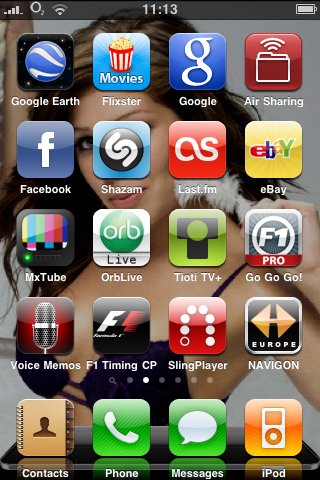
Nothing much of note here, Tioti TV+ is great if you need remote record for your iPhone. Far better than the offering from Sky! Air Sharing is great for carrying documents around if you don't want to have the hassle of a USB stick.
Page 3
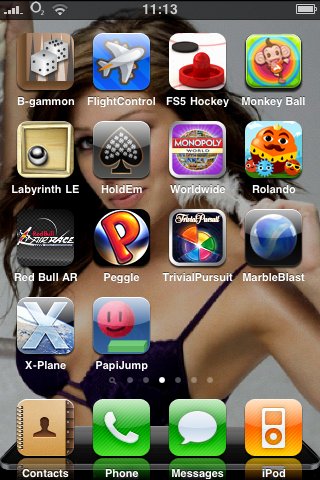
It's the games page, PapiJump is a great little game that is simple yet addictive. Peggle and Flight Control are my favourite games. But probably my most heavily played title has to be B-gammon, I simply love Backgammon and play it as much as I possibly can. It's the only app that has been on my iPhone from the day I got it!
Page 4
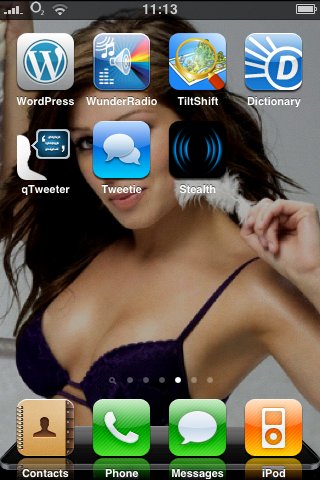
Another app page here, and of course some gratuitous cleavage as well. These tend to me my rarely used apps, though Tweetie should really be promoted! WunderRadio is great for listening to radio stations via the iPhone too.
Page 5

This is the page where I keep my "work apps", so there's a weight converter a noise level meter a couple of gobo libraries. A lighting rig remote control (Luminair), a dip switch tool to save my brain working out the binary arithmetic and finally a gel swatch library.
The more observant among you may have noticed there's a bit more cleavage here too!
Page 6
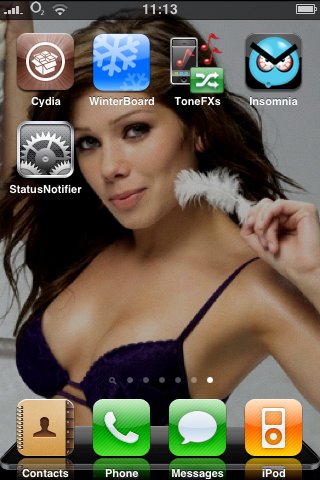
The final page of apps! This is my Jailbreak page, it has Cydia the package manager and installer. Winterboard which lets you customise the theme as I explained earlier and ToneFXs allowing me to have custom SMS alerts etc.
I also have StatusNotifier which puts little icons in the status bar when I have new mail, or my phone is on silent. There are other icons too, it's rather a handy app. Oh and of course more cleavage :-)
I love my Jailbroken iPhone, it gives me all the things Apple should have done!
What's in your iPhone
So in reply to that blog, here is my response. This is what's on my iPhone:
Page 1
The first thing to notice is that my iPhone is jailbroken which means I can customise quite a bit on the phone. The most obvious thing is the wallpaper, having a custom wallpaper is normally only possible on the lock screen. Now whenever I see an iPhone with a black background I can't help but feel it looks boring.
Another thing you may have noticed is the reflective dock and the different image for the dock. Also the carrier logo (02) in the status bar at the top is the actual O2 logo rather than the dull O2-UK you would normally see.
Two of my app icons are also different if you look closely. The Clock app is actually showing the correct time and the Weather app has the current weather for my location displayed.
I think the only other thing worth mentioning here is the Cycorder app, this gives the iPhone 3G video capability. No need to upgrade to an iPhone 3GS for that!
Page 2
Nothing much of note here, Tioti TV+ is great if you need remote record for your iPhone. Far better than the offering from Sky! Air Sharing is great for carrying documents around if you don't want to have the hassle of a USB stick.
Page 3
It's the games page, PapiJump is a great little game that is simple yet addictive. Peggle and Flight Control are my favourite games. But probably my most heavily played title has to be B-gammon, I simply love Backgammon and play it as much as I possibly can. It's the only app that has been on my iPhone from the day I got it!
Page 4
Another app page here, and of course some gratuitous cleavage as well. These tend to me my rarely used apps, though Tweetie should really be promoted! WunderRadio is great for listening to radio stations via the iPhone too.
Page 5
This is the page where I keep my "work apps", so there's a weight converter a noise level meter a couple of gobo libraries. A lighting rig remote control (Luminair), a dip switch tool to save my brain working out the binary arithmetic and finally a gel swatch library.
The more observant among you may have noticed there's a bit more cleavage here too!
Page 6
The final page of apps! This is my Jailbreak page, it has Cydia the package manager and installer. Winterboard which lets you customise the theme as I explained earlier and ToneFXs allowing me to have custom SMS alerts etc.
I also have StatusNotifier which puts little icons in the status bar when I have new mail, or my phone is on silent. There are other icons too, it's rather a handy app. Oh and of course more cleavage :-)
I love my Jailbroken iPhone, it gives me all the things Apple should have done!
Friday, 8 May 2009
The car door saga
I have a lovely car, well I like it:

Recently the electric window broke in the passenger door, I did a bit of research and discovered that it was likely to be the window regulator. I had no idea what one of those is or what it does, but I have a good friend in the motor trade who sells car parts to garages. I explained to him what the problem was and he ordered me the part.
I had to wait a couple of weeks for it to arrive as the supplier was out of stock. It arrived last week so at the weekend I went about replacing it. Having no idea what I was doing I searched the internet and found a fantastic tutorial on the Seat forums:
Replacing the front door window regulator
Armed with this comprehensive guide I felt fairly confident and set aside a reasonable chunk of time (3 hours) to do the job. It all went surprisingly well and without too many dramas, though I did have a problem getting panel back on with the new metal guides attached because they were slightly longer than the old ones.
However, almost exactly three hours after I started the job was done. I hit the button and to my joy the window went up and down again just as it should. I was enjoying the feeling of immense satisfaction at a job well done and also saving myself a few hundred quid by not getting a garage involved.
Just then, total disaster struck! I closed the door...... Now normally this wouldn't be a problem, but for some reason I just could not open it again. I tried for the inside, the outside, tried locking and unlocking it. Nothing would let me open the door again!
I eventually gave up and resigned myself to paying the dealer a fortune to put it right. So today I took a trip to my 'local' Seat dealer, some 20 odd miles away. To my amazement the service manager was extremely helpful, he told me exactly how I could fix the problem myself. I was expecting him to just book it in and quote me a three figure sum to do it for me. I left with the reassuring words of the service manager in my ears, "Any problems, just give me a call and if you want we will be happy to do it for you, but it's going to cost you!".
So, armed with this fresh information and worried about the required cash needed to have it done, I was determined not to be beaten! As soon as I arrived home I removed the door panel as explained to me. Immediately I was able to open the door, hallelujah!
I haven't been able to fix the problem totally though. It seems the metal rod that pokes up through the top of the door card and acts as the lock has been bent. This means when the door panel is fitted the lock can't move up and down. So it's stuck and won't allow the door to open.
The service engineer said I could try to straighten it, but it would probably be easier to replace the whole rod. He will have to order the rod, so I've decided to at least try and straighten it. I'll give it a go tomorrow because it's getting cold outside now. I'll let you know how it all goes.

Recently the electric window broke in the passenger door, I did a bit of research and discovered that it was likely to be the window regulator. I had no idea what one of those is or what it does, but I have a good friend in the motor trade who sells car parts to garages. I explained to him what the problem was and he ordered me the part.
I had to wait a couple of weeks for it to arrive as the supplier was out of stock. It arrived last week so at the weekend I went about replacing it. Having no idea what I was doing I searched the internet and found a fantastic tutorial on the Seat forums:
Replacing the front door window regulator
Armed with this comprehensive guide I felt fairly confident and set aside a reasonable chunk of time (3 hours) to do the job. It all went surprisingly well and without too many dramas, though I did have a problem getting panel back on with the new metal guides attached because they were slightly longer than the old ones.
However, almost exactly three hours after I started the job was done. I hit the button and to my joy the window went up and down again just as it should. I was enjoying the feeling of immense satisfaction at a job well done and also saving myself a few hundred quid by not getting a garage involved.
Just then, total disaster struck! I closed the door...... Now normally this wouldn't be a problem, but for some reason I just could not open it again. I tried for the inside, the outside, tried locking and unlocking it. Nothing would let me open the door again!
I eventually gave up and resigned myself to paying the dealer a fortune to put it right. So today I took a trip to my 'local' Seat dealer, some 20 odd miles away. To my amazement the service manager was extremely helpful, he told me exactly how I could fix the problem myself. I was expecting him to just book it in and quote me a three figure sum to do it for me. I left with the reassuring words of the service manager in my ears, "Any problems, just give me a call and if you want we will be happy to do it for you, but it's going to cost you!".
So, armed with this fresh information and worried about the required cash needed to have it done, I was determined not to be beaten! As soon as I arrived home I removed the door panel as explained to me. Immediately I was able to open the door, hallelujah!
I haven't been able to fix the problem totally though. It seems the metal rod that pokes up through the top of the door card and acts as the lock has been bent. This means when the door panel is fitted the lock can't move up and down. So it's stuck and won't allow the door to open.
The service engineer said I could try to straighten it, but it would probably be easier to replace the whole rod. He will have to order the rod, so I've decided to at least try and straighten it. I'll give it a go tomorrow because it's getting cold outside now. I'll let you know how it all goes.
I'm on Twitter
Yup, just like my blog I held off for a long time. But now I've finally given in to the Twitter lure. If you are a fellow twitterite you can follow me at http://www.twitter.com/lufferov, leave me your details in the comments below and I'll follow you.
Friday, 3 April 2009
Formula 1 and the FIA, what a joke
So the new F1 season opened in Malaysia at the weekend and it was a superb race. In fact it's the most excited I've been about a new F1 season for a long time. The rule changes are set to make things a lot more interesting. But just a few days later, the FIA have managed to turn a fantastic race into a complete farce and potentially ruin the entire season before it's barely begun!
There were a number of incidents in the grand prix, I want to focus on three of them here:
Trulli - Hamilton
Trulli was the one who lost control and put his car off the track. Hamilton gave the position back whilst waiting for race control to give them an answer, just to play it safe. Race control never gave them an answer as to whether he had to do that! So is it the right decision, I think that's controversial. But what's really not right is setting out to make Hamilton look like the bad guy in all this.
Barrichello
How about the first corner where Barrichello caused an avoidable accident taking out other competitors? Ending Kovalainen's race and ruining Webber, Sutil and Heidfeld's race! He finishes second and nothing is said about it. Now what if that had been Hamilton? I can't help thinking it would be a totally different story then!
Vettel - Kubica
Then there was the Vettel, Kubica crash, which in my view was clearly 50/50. Vettel had track position and Kubica did not leave him enough room, I don't see how or why Vettel should have been forced to give up his position there. A 10-place penalty for that incident is harsh.
It would seem there are now three stages to an F1 race, qualifying, racing, and the FIA manipulation of results. What's the point of watching a race when the result can change several times after the event?
Do FIFA go around awarding goals after a football match because of a foul the referee didn't see, or deducting them because the ref awarded a penalty which he shouldn't? In fact is there any other sport where this sort of thing happens?
There were a number of incidents in the grand prix, I want to focus on three of them here:
Trulli - Hamilton
Trulli was the one who lost control and put his car off the track. Hamilton gave the position back whilst waiting for race control to give them an answer, just to play it safe. Race control never gave them an answer as to whether he had to do that! So is it the right decision, I think that's controversial. But what's really not right is setting out to make Hamilton look like the bad guy in all this.
Barrichello
How about the first corner where Barrichello caused an avoidable accident taking out other competitors? Ending Kovalainen's race and ruining Webber, Sutil and Heidfeld's race! He finishes second and nothing is said about it. Now what if that had been Hamilton? I can't help thinking it would be a totally different story then!
Vettel - Kubica
Then there was the Vettel, Kubica crash, which in my view was clearly 50/50. Vettel had track position and Kubica did not leave him enough room, I don't see how or why Vettel should have been forced to give up his position there. A 10-place penalty for that incident is harsh.
It would seem there are now three stages to an F1 race, qualifying, racing, and the FIA manipulation of results. What's the point of watching a race when the result can change several times after the event?
Do FIFA go around awarding goals after a football match because of a foul the referee didn't see, or deducting them because the ref awarded a penalty which he shouldn't? In fact is there any other sport where this sort of thing happens?
Monday, 2 February 2009
Jailbroken iPhone 3G - essential apps
No activity here for a month, and then two posts in one day! What's going on? Well I've been finding out lots of cool things about the iPhone and I have to tell people.
I've got an iPhone 3G, I've had it for a while now. It's a great phone in so many ways, but it lacks some pretty unforgivable things, I've mentioned some of them here in previous posts. However, thanks to the wonders of the iPhone jailbreak these shortcoming can be fixed. That is if you are prepared to hack your phone with a little utility.
Just thought I'd post some of the really useful apps you can get on a jailbroken iPhone which lets it do the stuff you would expect it to out of the box. But also discover some of the cool things you can do to enhance the iPhone even more.
First of all though, you need to get your iPhone jailbroken. This really couldn't be any simpler, there are a couple of options but by far the easiest is QuickPwn. All you have to do is update your iPhone to the latest firmware from iTunes, then connect your phone up and run the QuickPwn application on your PC or mac. It gives clear instructions on what you need to do and it really is so simple and painless. You can download the latest version of QuickPwn here:
http://www.quickpwn.com.
I'm not going to give you a full step-by-step guide, it's all pretty self explanatory anyway and there are already hundreds of people out there who have done it before. If you're really confused just do a Google search!
Right, so I'm going to assume your phone is now jailbroken and you are free from Apple's closed world. The first thing you want to do is check out a new application installed on your phone called Cydia. It's basically a package installer/manager for the iPhone. A bit like the App Store, but consists of unofficial applications which are not approved by Apple. Most are completely free, but some require you to purchase a key to fully unlock them once installed.
You'll probably have to install some essential upgrades if it's the first time you've run it, so go ahead and do that first. To learn how to use Cydia I recommend this tutorial. When you've got the basic idea take a look below at my suggestions for what's essential for you to install from Cydia to get the most from you iPhone.
The first thing has to be WinterBoard. This allows you to theme your iPhone, from something as simple as adding a customised wallpaper to your iPhones menu (called the Springboard). To a full blown theme changing the icons, sounds, keyboard, clock, battery indicator etc... According to Cydia there are currently 673 items compatible with Springboard that you can download as well as 91 different battery icons, 27 keyboard layouts, 94 lockscreens, 44 sound themes, 103 system themes and much more besides!
For example, don't like the way you have to slide your finger to unlock the iPhone? No problem, just install "A Better Tap to Unlock". It will let you unlock your phone with a tap on the screen. There are so many customisations you can make!
Next on my list is ToneFXs. It lets you change your ringtone easily, but also lets you set sounds for new sms messages, Voicemail, email, calendar alerts, keyboard clicks, photo shutter, lock & unlock sound, charging sound. Check out this rather long video of ToneFXs in action. Can't say I like his choice of sounds, but that's the point, you can have whatever you like!
My next tip is BossPrefs which gives you quick access to turn on or off, 3G, Edge, Wifi, Bluetooth and email. It also gives you access to power options to respring the iPhone, reboot or power off. This can be very handy if you have a problem!
Other cool apps include LiveClock (used to be called LiveTime) which turns your clock icon into a real clock that actually shows the correct time. WeatherIcon, that means your weather icon will show the current weather instead of a sunny 73 degrees all the time. hClipboard that adds a copy & paste capability to your keyboard!
LockCalendar, which puts up to ten upcoming events in your calendar on the Lock screen. This is so useful and was a huge oversight by Apple!
There is also a selection of games available ranging from a Pacman style rip-off called "Macman", to a port of DOOM & Quake, emulators for the NES and Sega Genesis (MegaDrive), a MAME app and more besides.
To sum up, jailbreaking an iPhone really does open up a whole new world of possibilities! I could never go back to a generic firmware now, I've seen the light. Give it a try, but make sure you know what you're doing first. I'd hate you to destroy your precious phone!
EDIT: How could I possibly forget what is almost certainly the best app for a jailbroken iPhone. It's called Cycorder and it gives your iPhone video recording capability. It's truly amazing, the video quality is superb with almost no compression. It captures video at 384x288 which is a 4x3 aspect ratio at 15fps, although this will drop to 6fps in low light conditions. It sound like that might be bad, but trust me. The low frame rate means that the shutter is open longer allowing more light in per frame. This actually allows Cycorder to perform better in low light conditions than many other camera phones because you can actually see stuff... albeit slightly jerky, but in my opinion, that's better than not seeing anything at all!
Take a look at this demo of Cycorder which was actually recorded on another iPhone using the Cycorder app. Video quality looks great, sound is clear, the whole package is very well done.
UPDATE: There's now a follow up post to this article on my blog - More essential apps for a Jailbroken iPhone
I've got an iPhone 3G, I've had it for a while now. It's a great phone in so many ways, but it lacks some pretty unforgivable things, I've mentioned some of them here in previous posts. However, thanks to the wonders of the iPhone jailbreak these shortcoming can be fixed. That is if you are prepared to hack your phone with a little utility.
Just thought I'd post some of the really useful apps you can get on a jailbroken iPhone which lets it do the stuff you would expect it to out of the box. But also discover some of the cool things you can do to enhance the iPhone even more.
First of all though, you need to get your iPhone jailbroken. This really couldn't be any simpler, there are a couple of options but by far the easiest is QuickPwn. All you have to do is update your iPhone to the latest firmware from iTunes, then connect your phone up and run the QuickPwn application on your PC or mac. It gives clear instructions on what you need to do and it really is so simple and painless. You can download the latest version of QuickPwn here:
http://www.quickpwn.com.
I'm not going to give you a full step-by-step guide, it's all pretty self explanatory anyway and there are already hundreds of people out there who have done it before. If you're really confused just do a Google search!
Right, so I'm going to assume your phone is now jailbroken and you are free from Apple's closed world. The first thing you want to do is check out a new application installed on your phone called Cydia. It's basically a package installer/manager for the iPhone. A bit like the App Store, but consists of unofficial applications which are not approved by Apple. Most are completely free, but some require you to purchase a key to fully unlock them once installed.
You'll probably have to install some essential upgrades if it's the first time you've run it, so go ahead and do that first. To learn how to use Cydia I recommend this tutorial. When you've got the basic idea take a look below at my suggestions for what's essential for you to install from Cydia to get the most from you iPhone.
The first thing has to be WinterBoard. This allows you to theme your iPhone, from something as simple as adding a customised wallpaper to your iPhones menu (called the Springboard). To a full blown theme changing the icons, sounds, keyboard, clock, battery indicator etc... According to Cydia there are currently 673 items compatible with Springboard that you can download as well as 91 different battery icons, 27 keyboard layouts, 94 lockscreens, 44 sound themes, 103 system themes and much more besides!
For example, don't like the way you have to slide your finger to unlock the iPhone? No problem, just install "A Better Tap to Unlock". It will let you unlock your phone with a tap on the screen. There are so many customisations you can make!
Next on my list is ToneFXs. It lets you change your ringtone easily, but also lets you set sounds for new sms messages, Voicemail, email, calendar alerts, keyboard clicks, photo shutter, lock & unlock sound, charging sound. Check out this rather long video of ToneFXs in action. Can't say I like his choice of sounds, but that's the point, you can have whatever you like!
My next tip is BossPrefs which gives you quick access to turn on or off, 3G, Edge, Wifi, Bluetooth and email. It also gives you access to power options to respring the iPhone, reboot or power off. This can be very handy if you have a problem!
Other cool apps include LiveClock (used to be called LiveTime) which turns your clock icon into a real clock that actually shows the correct time. WeatherIcon, that means your weather icon will show the current weather instead of a sunny 73 degrees all the time. hClipboard that adds a copy & paste capability to your keyboard!
LockCalendar, which puts up to ten upcoming events in your calendar on the Lock screen. This is so useful and was a huge oversight by Apple!
There is also a selection of games available ranging from a Pacman style rip-off called "Macman", to a port of DOOM & Quake, emulators for the NES and Sega Genesis (MegaDrive), a MAME app and more besides.
To sum up, jailbreaking an iPhone really does open up a whole new world of possibilities! I could never go back to a generic firmware now, I've seen the light. Give it a try, but make sure you know what you're doing first. I'd hate you to destroy your precious phone!
EDIT: How could I possibly forget what is almost certainly the best app for a jailbroken iPhone. It's called Cycorder and it gives your iPhone video recording capability. It's truly amazing, the video quality is superb with almost no compression. It captures video at 384x288 which is a 4x3 aspect ratio at 15fps, although this will drop to 6fps in low light conditions. It sound like that might be bad, but trust me. The low frame rate means that the shutter is open longer allowing more light in per frame. This actually allows Cycorder to perform better in low light conditions than many other camera phones because you can actually see stuff... albeit slightly jerky, but in my opinion, that's better than not seeing anything at all!
Take a look at this demo of Cycorder which was actually recorded on another iPhone using the Cycorder app. Video quality looks great, sound is clear, the whole package is very well done.
UPDATE: There's now a follow up post to this article on my blog - More essential apps for a Jailbroken iPhone
Subscribe to:
Posts (Atom)
